The Outer Worlds 2 Denuvo: No DRM Drama, Just Pure Obsidian Chaos
Obsidian’s back! And this time, they’re going bigger, bolder, and even more gloriously ridiculous. The Outer Worlds 2 lands on October 29, 2025, and everything we’ve seen so far screams “next-level space satire.”
From potato-firing guns to a revamped perks-and-flaws system that celebrates your worst habits, this sequel is shaping up to be a cosmic RPG playground in which your choices (and mistakes) matter more than ever.
But before we go any further, let’s tackle the question that orbits every PC player’s brain before a big release: What’s the deal with The Outer Worlds 2 Denuvo?
Pre-Order Your Discounted Copy of The Outer Worlds 2 @ 2Game Today!
Outer Worlds 2 Denuvo? Nope. Microsoft's Keeping Things Clean

We bring good news. As of now, there’s no sign of Denuvo anywhere near The Outer Worlds 2. While this could change, with less than two weeks till launch, Microsoft hasn’t listed it on the game’s official pages: not on Steam, not on the Xbox Store, not even in the fine print. And, considering its policy to disclose Denuvo DRM, that omission says a lot.
No Denuvo means no forced online checks, no mysterious frame dips, and no extra software wedged between you and your interstellar misadventures. Sure, publishers might get a touch of piracy panic, but for players, it’s a win - a clear sign that gameplay experience comes first.
Why No Denuvo Matters

Denuvo is one of those hot-button topics that divides the galaxy. It’s designed to protect games from the digital pirates of the seven seas, but many argue that players pay the price with performance hits, longer loading times, or restricted offline play.
By skipping Denuvo entirely (at least for now), Microsoft and Obsidian are keeping up a refreshing trend of putting gamer experience first. This is something we’ve seen with other major Xbox Game Studios releases, such as Starfield, Avowed, and Hi-Fi RUSH, suggesting that The Outer Worlds 2's DRM status is also likely to stay clean. No Denuvo is a small but meaningful statement: trust the players, deliver performance, and let Game Pass handle the rest.
A Win for PC Players Everywhere

Between its expanded worlds, reactive storytelling, and now a clean, Denuvo-free bill of health (so far), The Outer Worlds 2 is shaping up to be one of 2025’s standout RPGs.
We appreciate that things may change, but it's looking likely that you'll be able to blast corporate goons, flirt with your morally ambiguous crew, and pick up new flaws for doing something stupid (again), all without Denuvo dragging its heels. Yes, Obsidian appears set to let you play your way, without Denuvo DRM getting in the way - and that’s exactly how it should be!
Pre-Order Your Discounted Copy of The Outer Worlds 2 @ 2Game Today!
CHECK OUT:
Keeping things clean
Get Up To 90% Off on SEGA Classics Today!
SEGA is back, and it's back with a vengeance! 2Game's big Autumn Sale now plays host to a whole bunch of top-tier AAA and AA releases, and they've been discounted by up to a whopping 90% off! We highly recommend checking out the full sale details using the big link featured below, but if you want to see just the must-have highlights, we've got those below.
Join the 2Game SEGA Autumn Sale today!
The gist of it all is that if you've been on the fence about any of the games featured below, now is absolutely the time to splurge. These games are excellent deals even at their full, non-discounted price points, but when the deals go up to 90% off... well, there's not much else that needs to be said, we think. Here's the jig!
Featured SEGA Autumn Sale Highlights
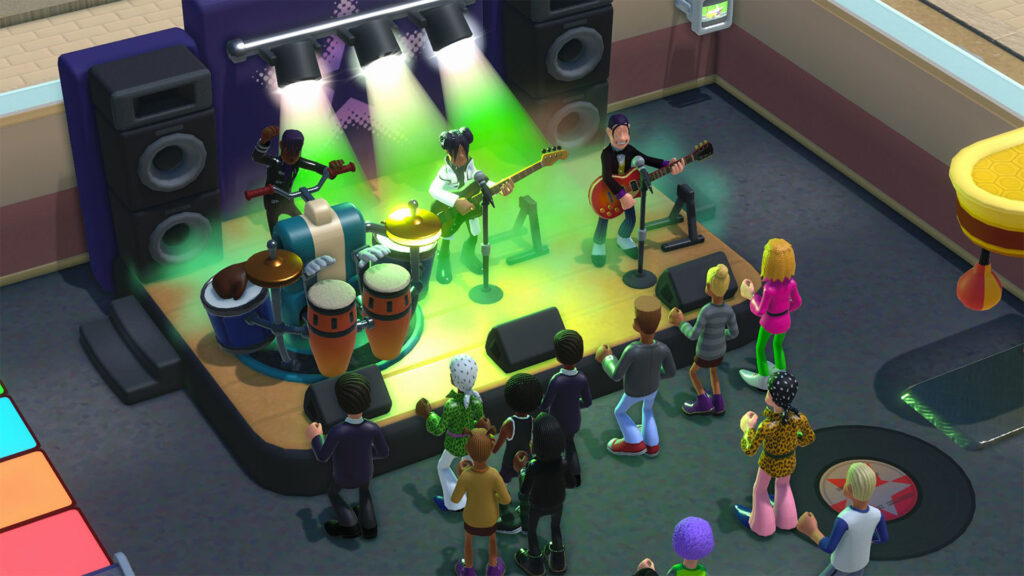
Two Point Campus @90% Off
The campus management simulation that captured hearts worldwide now comes at an unprecedented discount. Two Point Campus transforms players into university administrators, combining humor with strategic planning as they build and manage their dream educational institutions.

Metaphor: Refantazio Atlus 35th Digital Anniversary Edition @45% Off
Celebrating Atlus's remarkable 35-year journey, this special anniversary edition of Metaphor: Refantazio offers an immersive JRPG experience. The Digital Anniversary Edition includes exclusive content that commemorates three and a half decades of exceptional game development.

Shin Megami Tensei V: Vengeance @55% Off
The enhanced version of the critically acclaimed Shin Megami Tensei V brings expanded storylines and refined gameplay mechanics. Vengeance delivers the dark supernatural narrative that fans expect, with additional content that deepens the overall experience.

SONIC X SHADOW GENERATIONS @45% Off
The ultimate celebration of Sonic's legacy combines classic and modern gameplay styles. SONIC X Shadow Generations showcases both beloved characters in meticulously crafted levels that span the franchise's rich history.
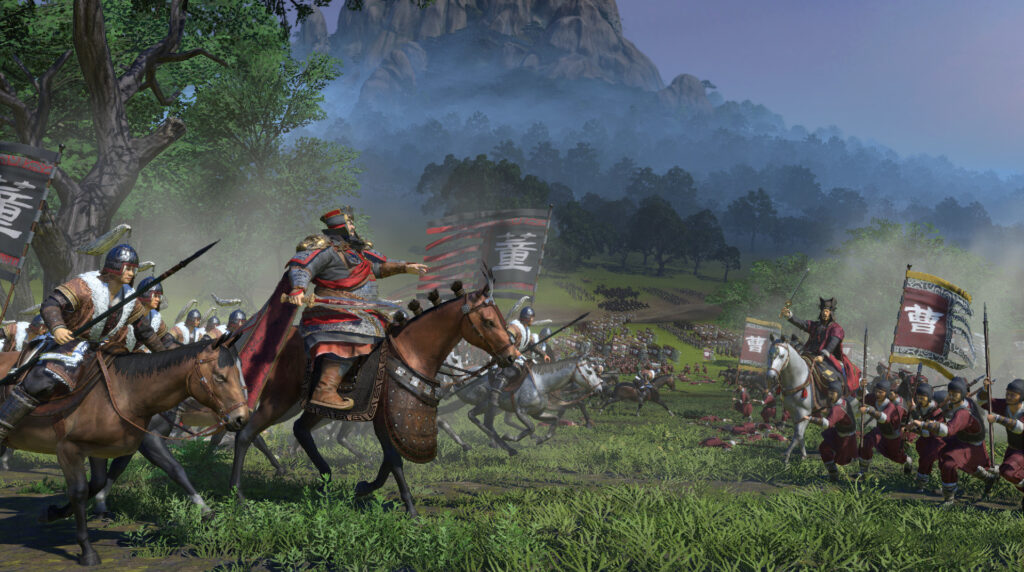
Total War: THREE KINGDOMS @80% Off
Strategy enthusiasts can command ancient Chinese armies at a fraction of the original cost. Total War: Three Kingdoms blends historical authenticity with engaging tactical combat, offering hundreds of hours of strategic gameplay.
Grab the Deals While They're Up!
These discounts represent exceptional value for both newcomers and series veterans. The sale encompasses multiple genres, ensuring every type of gamer finds something compelling. From the whimsical campus management of Two Point Campus to the epic battles of Total War: Three Kingdoms, the variety speaks to SEGA's diverse publishing portfolio.
The timing coincides perfectly with the autumn gaming season, when players typically seek engaging titles for longer indoor sessions. Each discounted game offers substantial content that justifies extended play sessions during the cooler months.
We recommend prioritizing purchases based on your gaming preferences and available time. Two Point Campus offers excellent value for casual gaming sessions, while Total War: Three Kingdoms provides deep strategic gameplay for dedicated strategy fans.
The Metaphor: Refantazio Anniversary Edition includes exclusive digital content that won't be available indefinitely, making it particularly attractive for collectors and JRPG enthusiasts. Don't miss these limited-time offers during the SEGA Autumn Sale!
SEGA is back, and it’s back with a vengeance! 2Game’s big Autumn Sale now plays host to a whole bunch of top-tier AAA and AA releases, and they’ve been discounted by up to a whopping 90% off! We highly recommend checking out the full sale details using the big link featured below, but if you […]
Ball X Pit Characters: How to Unlock Them All!
As our new go-to Steam Deck game, Ball X Pit lends itself phenomenally well to playing sessions both short and long, and that's due in no small part to its incredible roster of content. Setting aside all the other bits and bobs, there's 15 unique characters total for you to unlock, and we'll explain exactly how to go about doing it!
Though your only starter option is the humble Warrior, that's not going to be the case for a very long time. From the deputy to the assassin, Ball X Pit has a patently ridiculous number of bespoke characters and their own unique starter balls. You'll find the complete list waiting for you below, alongside their respective unlock requirements.
Play Ball X Pit @ 2Game!

All Ball X Pit Characters and How to Unlock Them
In Ball X Pit, new characters are unlocked by progressing through the hole itself, (ocassionally) defeating bosses, and building their respective housing in the townscape. Basically, the further down the pit you get, the better the odds of you unlocking new housing blueprints, which in turn means more characters to choose from for you.
We'll update this list as we get more information on the characters' bespoke unlock requirements!
| Character | Gimmick | Starter Ball | Unlock Requirement |
| The Warrior | No unique gameplay modifiers | Bleed Ball | - |
| The Itchy Finger | Fires twice as fast as the Warrior, moves at full speed while firing, and has scattered aim. | Burn Ball | Build Sheriff's Office |
| The Repentant | All balls deal 5% more damage per additional bounce, and return to the player upon hitting the back wall. | Freeze Ball | Build the Haunted House |
| The Cohabitants | Launch a copy of the launched ball in the horizontally mirrored direction, but the balls deal 50% of their base damage. | Brood Mother | Build the Cozy Home |
| The Cogitator | Auto-selects each upgrade. | Vertical Laser | Build the Villa |
| The Embedded | All balls pierce all enemies. | Poison Ball | Build Veteran's Hut |
| The Empty Nester | Cannot spawn baby balls, but each shot fires multiple instances of one equipped special ball. | Ghost Ball | - |
| The Shade | Balls are fired from the back wall; base crit chance is 10%. | Dark Ball | Build the Mausoleum |
| The Shieldbearer | Carries a massive shield that bounces balls back to the enemy. Balls deal 100% more damage per each shield-bounce. | Iron Ball | - |
| The Spendthrift | Fires all equipped balls simultaneously in a wide arcing motion. | Vampire Ball | - |
| The Flaggellant | Balls bounce off the bottom of the screen. | Egg Sac | - |
| The Juggler | Lobs balls into the air at a targeted position; balls only start bouncing after hitting the ground. | Lightning Ball | - |
| The Tactician | Makes the game turn-based. | Iron Ball | - |
| The Radical | Plays the game for you. | Wind Ball | - |
| The Physicist | All fired balls are affected by gravity and pulled towards the back of the arena. | Light Ball | - |
Given Ball X Pit's immediate popularity, we're sure this list is only going to grow with post-launch updates. Even today, though, there's such a glut of content to parse through that we don't think you'll be hard-pressed for even more goodies anytime soon.
Play Ball X Pit @ 2Game!
With over a dozen unique characters to choose from, Ball X Pit is loaded with bespoke content! Here’s how to unlock them all!
Ball X Pit on Steam Deck: The Full Guide
In the wake of the release of an entirely new wave (we won't call it generation) of PC gaming handhelds from Xbox, it may feel like the humble Steam Deck/OLED is falling by the wayside. We're thrilled to report that, with games such as Ball X Pit on Steam Deck, there's absolutely nothing to worry about, as the fancy new Roguelite runs like a dream on Valve's affordable handheld.
Ball X Pit is, at its core, a brick-breaking Arkanoid game. You've got your character or paddle, and projectiles bounce off of them to continuously and mercilessly destroy bricks as they approach you. Thing is, Ball X Pit adds a bonus twist to the formula by combining the Arkanoid loop with that of, say, R-Type or Space Invaders. Throw some base-building into the mix, a frankly ridiculous amount of content, and you've got a winner! Coincidentally, you also don't need to do much at all to make it work fabulously well on the Steam Deck! Find the recommended settings below!
Play Ball X Pit on your Steam Deck @ 2Game!

Optimal Settings for Ball X Pit on the Steam Deck
We love a good low-spec game here at 2Game, and Ball X Pit is precisely just that. It also looks excellent for a game of its caliber, which is a big bonus. To make it run well on the Deck, simply do the following:
- Cap your frame-rate to 60 FPS.
Yep! That's about all you need to do on the Steam Deck, believe it or not! The device is going to drink a relatively high amount of power for Ball X Pit, mind, between 8 and 12W depending on the scene, but this still nets you about 3-3.5 or 4-5 hours' worth of playtime depending on whether you have the LCD or the OLED model of the Deck, respectively.
Obviously, you can fiddle about with capping the frame-rate to 30, 40, or 45 FPS if you're trying to eke out more battery life, but this is hardly a necessity and we only recommend doing so if you're really hard-pressed for longevity.
All in all, Ball X Pit is one of our favorite new Steam Deck games, and it comes highly recommended. You can grab your Steam key right here at 2Game, in fact, and get on with losing yourself in its skeleton-infested ball-slaughter! It's good stuff!
Play Ball X Pit on your Steam Deck @ 2Game!
In the wake of the release of an entirely new wave (we won’t call it generation) of PC gaming handhelds from Xbox, it may feel like the humble Steam Deck/OLED is falling by the wayside. We’re thrilled to report that, with games such as Ball X Pit on Steam Deck, there’s absolutely nothing to worry […]
Outer Worlds 2 Co-Op: Why Obsidian’s Staying Solo (and Why That’s A Good Thing)
Is The Outer Worlds 2 co-op? It’s a fair question. After all, Obsidian’s got chops with Grounded, which, though a very different beast, is one of the best co-op survival games out there. And with The Outer Worlds 2 looking bigger, bolder, and more chaotic than ever, surely that means we’ll be able to explore Arcadia with a friend… right? Not quite.
Without beating about the bush, everything we've seen points to no Outer Worlds 2 co-op mode. No drop-in multiplayer. No “buddy system” for potato gun warfare.
But, before you curse the gaming universe, that might not be a bad thing. The Outer Worlds 2 might be one of those rare RPGs that don’t need co-op to feel collaborative, alive, and endlessly replayable. In fact, flying solo might be exactly what makes this upcoming sci-fi adventure your next obsession.
Pre-Order Your Discounted Copy of The Outer Worlds 2 @ 2Game Today!
A Universe Built Around You

Far from skipping corners, Obsidian’s decision to skip co-op is about doubling down on what they do best: Player choice.
If you read our earlier blog, The Outer Worlds 2 Gameplay: New Weapons, Bigger Worlds, and Obsidian’s Boldest RPG Systems Yet, you’ll know that this sequel is about you getting to shape your own story. The world reacts to your skills, flaws, and decisions - to your reckless dialogue options, your bad knees, and your questionable alliances.
The Outer Worlds 2 wants every firefight, every negotiation, every moral meltdown to feel handcrafted around your version of events. And honestly? That kind of intimate and reactive storytelling just doesn’t work with two captains steering the ship.
Your Companions Are Your Crew

And here's the thing. Yes, there's no Outer Worlds 2 co-op, but you’re not alone. You're just with your AI buddies! Obsidian’s companions have always been the beating heart of The Outer Worlds, so it makes sense they’d get even more responsive in the sequel.
Each with their own goals, backstory, and grudges, these companions aren't just quest-givers. They become your dysfunctional space family, shaping your journey in unpredictable ways. You’ll argue with them, rely on them, and maybe even lose them (emotionally or literally). And they’ll challenge your morality, authority, and trigger discipline, often with more personality than potential multiplayer mates! It’s not co-op, but it’s a deep, dynamic narrative companionship that's real.
The Outer Worlds 2 Is Personal

Obsidian could do co-op. Of course, they could; we've seen that with Grounded. But The Outer Worlds 2 is a different type of game. Holding a mirror up to your choices, it's meant to be personal. Adding multiplayer would risk fracturing the story’s pacing and undercutting its emotional punch.
So yes, there’s no Outer Worlds 2 co-op. But trust us, when the game launches on October 29, 2025, and you’re blasting through Arcadia’s neon-soaked chaos in full 4K with your AI crew bickering in the background, you'll embrace flying solo.
Pre-Order Your Discounted Copy of The Outer Worlds 2 @ 2Game Today!
Be brave!
Can you visit Okinawa in Yakuza Kiwami 3?
The claim that players cannot visit Okinawa in Yakuza Kiwami 3 is completely false. Yakuza 3 introduces Okinawa as a setting for the first time in the series, featuring Downtown Ryukyu and Morning Glory Beach as explorable sandboxes. The secondary location of Ryukyu in Naha, Okinawa, returns from the original in the upcoming Yakuza Kiwami 3 remake.
Pre-order Yakuza Kiwami 3 & Dark Ties Now!
Understanding Yakuza Kiwami 3's Setting
Yakuza 3 takes a departure from the first two games with its choice of setting, switching gears from the gritty cityscapes of Tokyo and Osaka to send Kazuma Kiryu to the rural Ryukyu Islands of Okinawa, where he runs the Morning Glory Orphanage. This represents a major shift in tone and atmosphere for the series.
The game is primarily set in two locations: the Tokyo district of Kamurocho and Okinawa. The game balances Kiryu's peaceful new life running an orphanage in Okinawa with his return to the criminal underworld of Tokyo.
What The Okinawa Setting Offers
Downtown Ryukyu is divided by a river over which the monorail line runs, splitting the area into northern and southern halves. This downtown section is a recreation of the Makishi district of Naha, the capital of Okinawa, featuring locations based on real-life landmarks.
The game includes real-life landmarks such as the Ichiba Hondori covered shopping arcade renamed Karyushi Arcade, the popular Makishi Public Market shortened to Public Market, and the famous entertainment strip Kokusai Street called Ryukyu Street.
The first few chapters of the game take place in the orphanage and nearby Downtown Ryukyu, where players can explore the city, complete substories, and enjoy many side activities during specific points in the story.
New Features In The Kiwami 3 Remake
The combat has been completely revamped in Yakuza Kiwami 3, featuring the latest version of the action systems and a new mode that lets players use Ryukyu weapons, with Okinawan-style weapons and ninjas inspired by the Okinawa setting.
Yakuza Kiwami 3 has been rebuilt from the ground up using the Dragon Engine, featuring overhauled visuals, new gameplay features, and additional story scenes, with both Japanese and English voice acting.
Release Information
Yakuza Kiwami 3 & Dark Ties will be released on February 12, 2026 on Steam, PlayStation 4 and 5, Nintendo Switch 2, and Xbox Series X/S. The game is not currently available, despite what some sources may claim.
Dark Ties will be bundled directly into the Yakuza Kiwami 3 set, allowing players to choose between the remake or the separate Mine story from the main menu.
The Story Behind Morning Glory Orphanage
In 2007, Kazuma Kiryu took over the Morning Glory Orphanage in Okinawa after being requested to do so by its former carers. As Kiryu was an orphan himself and wanted to get away from his Tojo Clan past, it was an offer he could not refuse.
A year after the Kanto-Kansai all-out war, Kazuma Kiryu and Haruka Sawamura leave the unforgiving streets of Kamurocho for the island of Okinawa to run the Morning Glory Orphanage. However, shadows of Kiryu's past threaten to entangle the orphanage in a deadly power struggle.
Traveling Between Locations
Taxis are placed around Okinawa and Kamurocho, represented as the letter T on the map. After paying a fare, Kiryu will be transported around each respective city. Players can move between both major locations throughout the game.
What Makes The Okinawa Setting Special
The Okinawa setting provides a stark contrast to the urban sprawl of Tokyo. With sandy beaches, tropical weather, and a slower pace of life, it offers players a different side of Japan rarely seen in video games. The peaceful orphanage scenes contrast dramatically with the violent underworld conflicts, creating emotional weight behind Kiryu's motivations.
When Yakuza Kiwami 3 launches in February 2026, players will experience both the tranquil shores of Okinawa and the neon-lit streets of Kamurocho in stunning modern visuals, making this one of the most geographically diverse entries in the series.
Pre-order Yakuza Kiwami 3 & Dark Ties Now!
You can absolutely visit Okinawa in Yakuza Kiwami 3. The remake features both Okinawa’s Downtown Ryukyu and Kamurocho when it launches February 12, 2026.Retry
How Does Multiplayer Work In Europa Universalis V?
Europa Universalis V is a grand strategy game being developed by Paradox Tinto and published by Paradox Interactive, set to release on November 4, 2025. While the game's Steam page confirms that multiplayer will be included as a feature, specific details about how multiplayer functions in this upcoming title have not been fully revealed yet.
Stay tuned for EU5 @ 2Game!
What We Know About Europa Universalis V
Europa Universalis V allows players to take control of a country and guide it through world history, spanning from April 1, 1337, a month before the Hundred Years' War, to 1837, the year Queen Victoria accedes to the British throne. Unlike previous installments, most parts of the gameplay may be automated, allowing players to focus on specific mechanics such as trade or military while giving control over others to the game's AI.
The game is priced at $59.99 USD for the Standard Edition, with a Premium Edition available for $84.99 USD that includes four pieces of DLC. Players who pre-order will receive a complete MP3 collection of Europa Universalis IV's soundtrack.
Major Gameplay Changes From EU4
One of the biggest changes from previous games is the removal of the MANA system, where players earned and spent points to perform certain actions. Instead, a nation's leaders and advisors' skills are split into administrative, diplomatic, and military ratings, which reflect how long related actions will take and how effective they will be.
The game introduces a new Societal Value system that reintroduces political value sliders from the original three EU games, providing fluidity in how you run your nation. Population models and trade systems have received a complete overhaul, with individual units called pops that have religion, location, culture, employment rate, and literacy rate associated with them.
What To Expect From Multiplayer Based On EU4
Since specific multiplayer details for Europa Universalis V have not been announced, we can look at how multiplayer worked in Europa Universalis IV as a reference point for what players might expect.
In EU4's multiplayer system, players could host or join games through Steam's infrastructure. The host would create a game with customizable settings including player count, speed, and various gameplay options. Other players could then search for available games and join using passwords if required.
Multiplayer sessions in EU4 typically ran slower than singleplayer, as the host controlled game speed and needed to accommodate all players' actions. Games could be saved and resumed across multiple sessions, with many multiplayer communities organizing regular weekly sessions lasting several hours each.
The cooperative aspect allowed players to control separate nations and work together, or compete against each other in the same world. Hot-join features permitted players to join ongoing games when enabled by the host.
When Will We Learn More About EU5 Multiplayer?
As we approach the November 4, 2025 release date, Paradox Tinto will likely reveal more specific details about how multiplayer functions in Europa Universalis V. The development team has been posting regular updates called Tinto Talks on the Paradox forums, which may provide additional information about multiplayer features closer to launch.
Players interested in the game can follow these developer blogs for the latest information, or check the official Steam page for updates as they become available.
The Bottom Line
Europa Universalis V releases on November 4, 2025, and while multiplayer has been confirmed as a feature, specific implementation details have not been fully revealed yet. Based on the series' history and EU4's robust multiplayer system, players can likely expect comprehensive multiplayer options, but we'll need to wait for official announcements or the game's launch to know exactly how it will work in this new iteration.
For now, series fans can look forward to significant gameplay innovations including the removal of mana systems, detailed population simulation, and extensive automation options that may influence how multiplayer sessions unfold when the game finally arrives.
Stay tuned for EU5 @ 2Game!
Europa Universalis V releases November 4, 2025 with confirmed multiplayer features. Learn what we know about EU5’s multiplayer and what to expect based on the series’ history.
Can you play as Majima in Yakuza Kiwami: Dark Ties?
Majima is not a playable character in Yakuza Kiwami, the remake of the first Yakuza title. However, the game features a system called Majima Everywhere, where Goro Majima attacks Kazuma Kiryu in a large variety of ways throughout the game.
Pre-order Yakuza Kiwami 3 & Dark Ties Now!
What Is Yakuza Kiwami And Dark Ties?
First, we need to clear up confusion about game titles. Yakuza Kiwami 3 & Dark Ties is a bundle containing Yakuza Kiwami 3, an extreme remake of Yakuza 3, and Dark Ties, a brand-new separate game featuring Yoshitaka Mine. These are two distinct products from the original Yakuza Kiwami.
Dark Ties is set before the events of Yakuza 3 and follows Mine's journey from businessman into the yakuza underworld, allowing players to experience his descent into organized crime. Mine, not Majima, is the protagonist of Dark Ties.
Understanding The Majima Everywhere System
The Majima Everywhere system allows Goro Majima to attack Kiryu at any point during gameplay, initiating battles with the intention of improving his mastery of the Dragon fighting style. This is the main way that Kiryu is able to re-learn all of the Dragon Style abilities after spending ten years in prison.
Majima will disguise himself as a police officer, traffic cone, taxi driver, and even as a zombie in order to ambush Kiryu when he least expects it. Once you reach Chapter 2, Majima begins roaming the streets and will chase Kiryu if he spots him, forcing him into battles.
Where Can You Actually Play As Majima?
Majima is playable as a protagonist in three Yakuza games: Yakuza 0, Yakuza Kiwami 2, and Yakuza: Dead Souls. The Majima Saga in Yakuza Kiwami 2 is comparable to what Dark Ties offers for Mine, providing a separate playable story accessible from the main menu.
In Yakuza 0, Majima shares protagonist duties with Kiryu, alternating between their stories as the narrative unfolds. This prequel explores his transformation from a disgraced yakuza member working at a cabaret club to the Mad Dog of Shimano persona fans know.
How The Majima Everywhere System Works
Your rank with Majima determines your progression through the system. Once you fill the Majima Everywhere Gauge, you'll receive a phone call from Nishida indicating where to find Majima for a challenge to advance in rank.
The objective is to fight Majima and fill the gauge so you can proceed to the next rank and unlock further Dragon Style fighting moves. If you lose these battles, it's not game over, but your health will be drained and you'll have to endure Majima's taunts.
Majima takes on various personas throughout Yakuza Kiwami, including Officer Majima, Zombie Majima, Everyone's Idol Goro, Goromi, Breaker Majima, and Slugger Majima. Each encounter provides unique challenges and rewards for defeating him.
What This Means For Players
Yakuza Kiwami released in 2016 as a complete remake of the original 2005 game, while Yakuza Kiwami 3 & Dark Ties launches on February 12, 2026 for PlayStation 5, PlayStation 4, Xbox Series, Switch 2, and PC.
If you want to play as Majima, your best options are Yakuza 0 for his full origin story or Yakuza Kiwami 2 for the Majima Saga. In Yakuza Kiwami, you'll experience Majima as an antagonistic mentor who appears throughout the game to help Kiryu regain his fighting prowess.
The Majima Everywhere system has become one of the most beloved features in the series, adding unpredictability and excitement to exploration while providing meaningful character development for both Kiryu and Majima. While you cannot directly control Majima in this particular game, his presence shapes the entire experience.
Pre-order Yakuza Kiwami 3 & Dark Ties Now!
Majima is not a playable character in Yakuza Kiwami, the remake of the first Yakuza title. However, the game features a system called Majima Everywhere, where Goro Majima attacks Kazuma Kiryu in a large variety of ways throughout the game. Pre-order Yakuza Kiwami 3 & Dark Ties Now! What Is Yakuza Kiwami And Dark Ties? […]
Can You Play As Nosferatu In Bloodlines 2? Not At Launch!
The Nosferatu clan will not be playable in Vampire: The Masquerade - Bloodlines 2 at launch. While these shadow-dwelling information brokers were a fan-favorite playable option in the original Bloodlines, they appear in the sequel exclusively as NPCs within the Unseen faction.
Get Vampire: The Masquerade - Bloodlines 2 @ 2Game soon!
Why Nosferatu Isn't Playable
The Nosferatu's exclusion from playable options stems from practical constraints related to their monstrous appearance, which makes standard NPC interactions and maintaining the Masquerade significantly more difficult. In vampire society, the Nosferatu suffer from one of the most debilitating banes of any clan, as they transform into hideous monsters upon their embrace.
In the original Bloodlines, the Nosferatu ran the risk of violating the Masquerade merely by being seen in public, which required players to use sewers and back routes to navigate the game world. This restrictive gameplay, while beloved by some fans, presented significant design challenges for a modern sequel.
The Nosferatu's Role In Bloodlines 2
Instead of being playable, the Nosferatu form the Unseen faction in Seattle, operating from the city's underground and specializing in gathering intelligence and trading secrets. The faction is led by the Council of Three, also known as the Speakers, and includes journalists, engineers, and hackers among their ranks.
Players will encounter Nosferatu characters like Samuel during the game, and while you cannot join their clan, you may be able to form alliances and trade information with them.
What Clans Are Actually Playable?
Bloodlines 2 launches with six playable clans: Brujah, Tremere, Banu Haqim, Ventrue, Lasombra, and Toreador. The Lasombra and Toreador clans were originally planned as paid DLC, but following community backlash, publisher Paradox Interactive announced they would be included in the base game.
Each clan offers distinct abilities and playstyles. The Brujah focus on aggressive close-range melee combat, the Tremere specialize in blood sorcery, the Banu Haqim favor stealth approaches, the Ventrue rely on mental manipulation and domination, the Toreador use seduction, and the Lasombra wield shadows as weapons.
Could Nosferatu Be Added Later?
While sources from 2019 suggested the Nosferatu could potentially be added as DLC later, there have been no official announcements confirming this possibility. The technical and design challenges associated with implementing the Nosferatu's unique gameplay restrictions in a modern game remain considerable.
The original Bloodlines gave the Nosferatu access to disciplines like Obfuscate for invisibility and various stealth-focused abilities, making them excel at information gathering but severely limiting their social interactions. Recreating this experience in a way that feels rewarding rather than restrictive would require substantial development resources.
What This Means For Your Playthrough
Bloodlines 2 releases on October 21, 2025 for PC, PlayStation 5, and Xbox Series X/S. While you cannot experience Seattle as a Nosferatu, the six available clans each offer meaningful differences in how you approach missions, interact with NPCs, and navigate vampire politics.
The Nosferatu remain an important part of the game's world through the Unseen faction. Their role as information brokers and watchers from the shadows ensures that players will still experience the flavor and lore of this iconic clan, just from a different perspective than the original game offered.
For players specifically drawn to stealth gameplay, the Banu Haqim clan provides a stealth-focused alternative, while those interested in the Nosferatu's information-gathering aspects will find opportunities to interact with the Unseen faction throughout the story.
Get Vampire: The Masquerade - Bloodlines 2 @ 2Game soon!
No, you cannot play as Nosferatu in Bloodlines 2 at launch. The clan appears as the Unseen faction instead. Learn which six clans are actually playable in the sequel.Retry
How To Redeem Your Borderlands 4 NVIDIA Code: Complete Guide
Gaming promotions can be exciting, but the redemption process sometimes causes confusion. If you've received a Borderlands 4 code through NVIDIA's promotional program and you're wondering how to claim your game, we've got you covered with this comprehensive guide.
Save up to 32% on Borderlands 4 using code ‘5OFF‘
What Is The NVIDIA Borderlands 4 Promotion?
NVIDIA frequently partners with game publishers to bundle popular titles with their graphics cards. The Borderlands 4 promotion typically comes with qualifying GeForce RTX graphics cards, giving buyers a free copy of the game alongside their hardware purchase.
These promotions usually have specific eligibility requirements. Your graphics card needs to be purchased from participating retailers within the promotional period, and you'll need to redeem the code before the expiration date listed in your promotional materials.

How To Redeem Your Borderlands 4 NVIDIA Code
The redemption process involves two main steps: activating your code through NVIDIA's GeForce Experience platform and then linking it to your gaming account.
Step 1: Log Into GeForce Experience
First, you'll need to download and install GeForce Experience if you haven't already. This software manages your NVIDIA drivers and also handles game code redemptions. Once installed, sign in with your NVIDIA account. If you don't have one yet, creating an account takes just a few minutes.
Step 2: Access The Redeem Portal
Navigate to the account section within GeForce Experience. Look for the "Redeem" option in the menu. This is where you'll enter your promotional code. The code typically comes on a physical card with your graphics card purchase or via email if you bought from an online retailer.
Step 3: Enter Your Code
Type or paste your Borderlands 4 promotional code into the designated field. These codes are usually case-sensitive, so enter them exactly as they appear. After submitting, the system will verify your code and check that your hardware meets the promotional requirements.
Step 4: Link To Your Platform
Once NVIDIA verifies your code, you'll need to link it to your gaming platform. Borderlands 4 codes typically redeem through Steam or the Epic Games Store, depending on the specific promotion. Follow the on-screen instructions to connect your account and claim the game.
Step 5: Download And Install
After successfully linking your account, the game will appear in your library. You can then download and install Borderlands 4 just like any other game in your collection.
Troubleshooting Common Redemption Issues
Not all redemption attempts go smoothly. Here are solutions to the most common problems players encounter.
Code Already Used Or Invalid
If you receive an error stating your code is already used or invalid, double-check that you're entering it correctly. These codes are case-sensitive and can be easy to misread. The letter "O" can look like the number "0," and "I" can resemble "1" or "l."
If you're certain you've entered the code correctly and it still doesn't work, contact the retailer where you purchased your graphics card. They can verify whether the code was activated properly at the point of sale.
Hardware Not Eligible
Sometimes the redemption portal indicates your hardware doesn't qualify for the promotion. This usually happens if your graphics card model isn't part of the promotional program or if your card was purchased outside the promotional window.
Verify that your specific GPU model is listed in the promotional terms. Not all GeForce RTX cards qualify for every promotion. If your card should qualify but the system isn't recognizing it, try updating your GeForce Experience to the latest version and ensure your graphics drivers are current.
GeForce Experience Not Detecting GPU
If GeForce Experience doesn't detect your graphics card, the redemption process won't work. Start by checking that your GPU is properly seated in its PCIe slot and that all power connectors are secure. Restart your computer after checking these connections.
Next, ensure your NVIDIA drivers are up to date. Outdated drivers can prevent proper hardware detection. You can download the latest drivers directly from the NVIDIA website if GeForce Experience isn't functioning properly.
Account Linking Problems
When connecting your NVIDIA account to Steam or Epic Games, you might encounter authentication errors. Make sure you're signed into the correct gaming account before attempting to link. If you have multiple accounts, linking to the wrong one means your game will appear in that library instead.
Clear your browser cache and cookies if the linking page won't load properly. Sometimes cached data interferes with the authentication process.
Expired Codes
NVIDIA promotional codes have expiration dates. If you've waited too long to redeem your code, it may no longer be valid. Check the promotional materials that came with your graphics card for the redemption deadline.
Unfortunately, expired codes typically cannot be reactivated. This is why we recommend redeeming promotional codes as soon as possible after purchase.

Regional Restrictions And Availability
Some NVIDIA promotions have regional restrictions. A code purchased in one country might not work if you're trying to redeem it from a different region. This happens because game publishers sometimes have different distribution agreements in various territories.
If you purchased your graphics card while traveling or from an international retailer, verify that the code works in your current region. Contact NVIDIA support if you believe you're experiencing issues due to regional restrictions.
Multiple Codes And Promotional Bundles
Occasionally, NVIDIA offers bundle promotions that include multiple games. If your purchase came with several codes, make sure you're entering the correct one for Borderlands 4. Each code will be labeled with the specific game it unlocks.
These codes must be redeemed individually. Entering them all at once or in the wrong order won't work. Follow the same redemption process for each code separately.
System Requirements And Download Preparation
Before redeeming your code, verify that your system meets the minimum requirements for Borderlands 4. While NVIDIA promotions typically bundle games with hardware capable of running them, other components like your CPU, RAM, and storage also matter.
Make sure you have sufficient storage space available for the download. Modern games can be quite large, and Borderlands 4 will require a substantial amount of drive space. We recommend having at least 100GB of free storage to accommodate the game and any future updates.
Getting Additional Help
If you've tried all these troubleshooting steps and still can't redeem your code, contact NVIDIA customer support directly. Have your promotional code, graphics card model number, and purchase receipt ready when you reach out. This information helps support representatives resolve your issue more quickly.
You can also check the official NVIDIA forums, where other users often share solutions to common redemption problems. Just remember to never share your actual promotional code publicly, as anyone with access to it can potentially redeem it.
Making The Most Of Your Game
Once you've successfully redeemed Borderlands 4, take some time to optimize your graphics settings. NVIDIA graphics cards offer various features like DLSS and ray tracing that can enhance your gaming experience. GeForce Experience includes an automatic optimization feature that analyzes your hardware and recommends settings for the best balance of visual quality and performance.
We hope this guide helps you successfully redeem your Borderlands 4 NVIDIA promotional code. The process should be straightforward when you follow these steps, but if you run into any issues, the troubleshooting tips should get you back on track. Happy looting, Vault Hunter!
Save up to 32% on Borderlands 4 using code ‘5OFF‘
Learn how to redeem your Borderlands 4 NVIDIA promotional code with our step-by-step guide. Get troubleshooting tips for common redemption issues and start playing today.Retry
 English
  German
  French
  Portuguese
  Spanish
  Polish
  Dutch
Dutch